Summary: From school buses and police cruisers to public works trucks, public agencies maintain a diverse fleet that moves across departments. Centralized fleet management software brings every vehicle into one view, helping teams cut waste, simplify oversight and make smarter decisions with taxpayer dollars. Here’s how to bring the whole operation together
Read time: 14 min
Government and municipal fleets juggle mixed vehicles, separate departments and public scrutiny. This guide explains how centralized fleet management software gives fleet managers one view of every asset, and how to use that view to tighten compliance, prevent breakdowns, cut fuel waste and make the case to leadership.
Government fleet management software is how city, county and state fleet teams see every vehicle, inspection and maintenance record in one place, whichever department it belongs to. With everything in one view, you know where each vehicle is and how much it's used. Compliance records are ready before the auditor asks. Your shop handles repairs before a breakdown leaves a crew stranded. And idling trucks stop burning through your fuel budget.
Ask a city fleet manager where a specific dump truck is right now, and you'll often get an educated guess or a pause. Then a phone call. Then a second phone call to a different yard. That's daily life in a lot of public sector fleets with dozens of departments, hundreds or thousands of assets and data spread across spreadsheets, paper forms and a handful of separate software logins.
Centralized software fixes that. This guide walks through what makes public sector fleet management different, how it improves visibility, compliance, maintenance and efficiency, and how to roll it out.
What makes government fleet management different?
Commercial fleets have plenty of challenges. Public sector fleets stack a few more on top, starting with tight budget constraints.
You manage every kind of vehicle at once
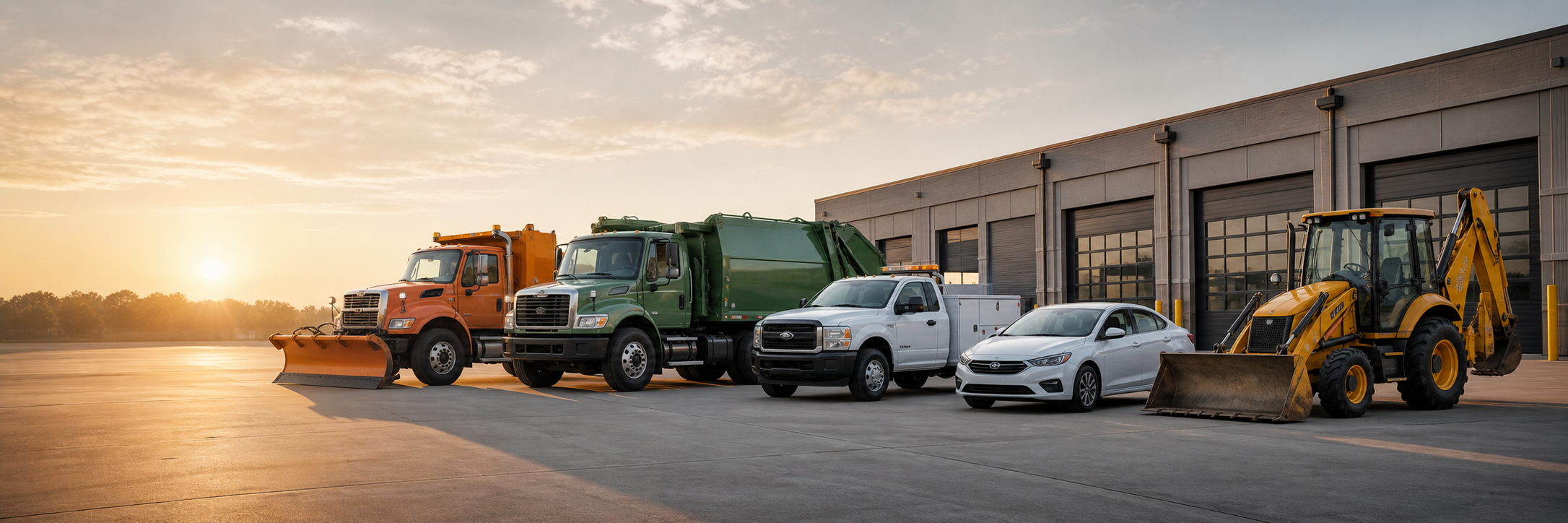
A single municipal fleet might run patrol cars, refuse trucks, snowplows, street sweepers, utility vans, transit buses, pool sedans and a yard full of backhoes and mowers. Each has its own duty cycle, maintenance schedule and inspection checklist. Tools built for one vehicle type rarely handle the rest.
Every department has its own system
Public works tracks its trucks one way. Parks uses a spreadsheet. Police run their own shop. When each department follows its own process, no one sees the entire fleet, and the fleet manager ends up reconciling reports by hand.
Every decision is public
In public sector fleet management, your budget comes from taxpayers, and your decisions show up in council meetings, audits and public records requests. You need to show where the money went and why. Gut feeling won't hold up at a budget hearing.
Vehicles stay in service longer
Replacement money arrives through annual or multiyear budget cycles. So public fleets often keep aging vehicles longer than they'd like, which puts more pressure on maintenance to keep older units safe and running. Denver's 2024 fleet audit found that 36% of the city's vehicles were past their 10-year useful lives, and 6% were more than 20 years old.
What is government fleet management software?
Here's how the platform supports day-to-day fleet operations management. Telematics devices on each vehicle report location, engine data and driving behavior. Drivers complete inspections on a tablet or phone. The shop sees service schedules, maintenance alerts and defects in the same system dispatch uses to see vehicle locations.
Zonar fleet management software adapts to how your fleet works. You configure it to fit each department, vehicle type and workflow, and it's designed to be easy for drivers, technicians and supervisors to use. Most centralized systems include some version of these core pieces:
-
GPS and telematics: Live location, engine hours, mileage, idle time and driving events from each vehicle
-
Electronic inspections: Pre- and post-trip inspections completed digitally, with defects reported as drivers find them
-
Maintenance tracking: Service schedules, fault codes and defect history tied to each asset
-
Fuel management: Fuel consumption and idle time by vehicle, department and driver
-
Reporting: Utilization, cost and compliance reports you pull on demand
The value comes from having it all in one system. A fault code means more when you see it next to the vehicle's inspection history and its next scheduled service.
How does centralized fleet software improve visibility?
Visibility is the foundation. Compliance, maintenance and efficiency all depend on knowing what you have, where it is and what condition it's in.
See where every vehicle is right now
It's 3 a.m., and the storm came in heavier than forecast. You need to know which plows are out, which are back at the yard and which one went quiet 20 minutes ago. That's where government vehicle tracking earns its keep. With live location on a single map, dispatch sees it within seconds and sends the nearest truck. No radio roll call.
The same applies on a normal Tuesday. When a resident calls about a missed pickup or a department head asks where truck 214 is, you have the answer on screen.
Find the vehicles that barely move
Many public fleets have vehicles that barely move. A pool sedan that logs a few dozen miles a month still costs money to insure, maintain and eventually replace. In Denver, a December 2023 Mercury Associates analysis cited by the Denver Auditor's Office found that 608 of 1,413 city vehicles (43%) were underused or severely underused. The analysis reported $5.7 million in maintenance and repair costs for those underused assets during 2022 and 2023. Utilization data shows you which units sit idle, which ones are overworked and where departments could share.
Low mileage doesn't automatically mean a vehicle isn't important. A standby unit for emergencies, a truck covering a rural district or a vehicle making short, frequent trips may log few miles and still earn its spot. That's why utilization reviews work best with more than one measure: miles, engine hours, days used and whether the vehicle must stay available. From there, your team decides whether to pool, reassign or surplus them.
Get one view across departments
When public works, parks, utilities and police all report into the same platform, you compare them on the same terms. Cost per mile, downtime and inspection completion mean the same thing everywhere. You stop reconciling spreadsheets and start managing the fleet as one operation.
Show residents the work got done
GPS history gives you a time-stamped record of where each vehicle went. When a complaint comes in, use it to confirm a street was plowed, a route was swept or a pickup was completed. Geofences around routes and service zones flag when a vehicle enters or leaves, so you see at a glance whether an area was covered. Some cities go a step further and publish live plow maps, so residents see progress without calling in.
How does fleet management software help government fleets stay compliant?
Compliance in a public fleet comes from many directions: federal and state rules, insurance requirements, internal policy and public accountability. Centralized software keeps consistent records across every department, so the time you used to spend on paperwork becomes time fixing what the records show.
Make inspections easy to check
Federal Motor Carrier Safety Administration (FMCSA) regulations exempt transportation performed by state and local governments from much of the federal rulebook, though rules like commercial driver's license (CDL) requirements still apply. Public fleets often still require documented pre- and post-trip inspections through state rules, insurance pools or their own safety policy. Many follow the same driver vehicle inspection report (DVIR) process commercial fleets use.
Paper forms make those inspections hard to check. A clipboard full of checkmarks won't tell you whether the driver walked around the truck.
Zonar EVIR® replaces the paper DVIR process with a digital inspection system. EVIR time-stamps every zone a driver checks, so fleet managers see whether an inspection happened or got rushed. That makes pencil-whipping easy to catch. Drivers report defects with photos, and completed inspections upload to your Zonar fleet management software for review. EVIR supports inspection configurations aligned with Department of Transportation (DOT) and Occupational Safety and Health Administration (OSHA) standards, and fleets customize inspections for equipment that needs its own checklist.
Coach safer driving
Speeding, harsh braking and harsh cornering show up in telematics and dashcam data, highlighting driver behavior for every vehicle. That gives supervisors specific events to talk through with drivers, in place of secondhand complaints. A consistent driver coaching program promotes driver safety and lowers risk for the public and your crews. It also gives your risk manager documentation if a claim comes in.
Enforce idling policies
Many states and cities set anti-idling rules for their own fleets. Colorado's state fleet anti-idling policy is one example. Idle time by vehicle and department shows you where the policy holds and where it slips. Once you account for work that needs the engine running, like a compactor or plow hydraulics, you coach the right drivers. If your state has emissions targets or requirements to integrate electric vehicles, the same data supports that reporting.
Keep records ready for audits and public records requests
When an auditor, insurer or reporter asks for inspection history, maintenance records or a vehicle's location on a specific date, you pull it from one system. Searchable digital records with clear audit trails take minutes to produce. Paper files spread across three yards take days.
How does centralized software change fleet maintenance?
Older vehicles and tight budgets make maintenance the place where good data pays off fastest. The goal is to fix small problems on your schedule before they turn into roadside breakdowns on someone else's.
The U.S. Department of Energy's Federal Energy Management Program, citing industry studies, estimates that a proper preventive maintenance program saves 12% to 18% on average compared with run-to-failure maintenance. That figure comes from facility equipment, not vehicles, but the costs behind it will sound familiar. DOE points to unplanned downtime, overtime, bigger repairs, and damage to other components. In a fleet, add towing and rush-ordered parts. Your own work order, downtime and parts data show what the gap looks like in your fleet.
Schedule preventive maintenance by actual use
Calendar-based service schedules miss how differently vehicles work. A refuse truck idling through a 10-hour route and a pool car parked most of the week shouldn't follow the same interval. Telematics reports each vehicle's real mileage and engine hours, so the shop sets preventive maintenance intervals by actual use.
Catch developing problems with predictive maintenance
Predictive maintenance responds to a vehicle's actual condition instead of the calendar or odometer. Engine fault codes often show up days or weeks before a driver notices a problem. Zonar FaultIQ®, our predictive maintenance platform available as an add-on, translates fault codes into plain language, ranks them by severity and recommends next steps, so your shop knows which issues need attention now and schedules the repair before a breakdown. It works across Class 1 through Class 8 vehicles and mixed makes and model years, which matters when your fleet runs pool sedans and refuse trucks side by side. FaultIQ works alongside your scheduled preventive maintenance. EVIR captures what a driver sees. FaultIQ reads what the vehicle reports. Together, they give your technicians a fuller picture.
Send inspection defects straight to the shop
When a driver flags a defect during an inspection, EVIR sends it to your connected fleet maintenance software, which initiates the work order. Nobody retypes a paper form. The shop sees the issue, the photos and the vehicle history at the same time and schedules the repair before the next shift.
Plan replacements with real numbers
Lifetime maintenance cost, downtime and utilization for each vehicle show you which units cost more to keep than to replace. In Denton, Texas, an August 2026 vehicle-management audit found that about 35% of the city's vehicles had total repair costs greater than their estimated resale value. Bring that to your next capital planning meeting, and your replacement list stops looking like a wish list.
How does centralized fleet management improve fleet efficiency?
Fleet efficiency comes down to getting the same work done with fewer miles, lower fuel consumption and less time behind a desk. For a public fleet, it's also the most direct path to cost control.
Cut fuel waste
Fuel is one of the largest line items in most fleet budgets, and good fuel management starts with knowing where it goes. Waste usually comes from several small habits: excessive idling, route overlap, aggressive driving and delayed maintenance. Centralized data shows each one by vehicle and department, so you know where fuel efficiency is slipping.
Idling adds up fast. The U.S. Department of Energy, citing research from Argonne National Laboratory, estimates that a heavy-duty truck burns about 0.8 gallons of diesel per hour it idles. At $4 per gallon, that's about $3,200 in fuel for every 1,000 idle hours per truck, before engine wear and maintenance.
Some idling in public fleets is part of the job. A refuse truck runs its compactor and a plow runs its hydraulics with the engine on. Review idle data alongside the work each crew was doing, and you separate necessary idling from the avoidable kind, like a pickup warming up for 20 minutes or a crew truck running through lunch. Then you target the biggest leaks first.
Dispatch the closest crew
When a water main breaks or a downed tree blocks a road, dispatch sees which crew is closest and which one has the right equipment. Fewer wasted miles. Faster response.
Spend less time on paperwork
Digital inspections, automatic mileage and engine-hour readings and a single reporting tool take a lot of manual data entry off your team's plate. That time goes back to managing the fleet.
Track equipment without an engine
Trailers, generators, light towers and attachments often go missing in public fleets. Asset trackers show where non-powered equipment sits, so crews stop hunting for it and departments stop buying duplicates.
Which government fleet KPIs should you track?
Start with a short list you review every month. These six give you a clear picture of fleet health and give leadership numbers they trust:
-
Utilization rate: How much each vehicle gets used, measured by miles, engine hours or days used, compared to a target for its class
-
Cost per mile or engine hour: Total operating and maintenance cost divided by use, and your clearest cost control measure
-
Preventive maintenance compliance: The share of scheduled services completed on time
-
Downtime: Days each vehicle spends out of service, and why
-
Idle percentage: Idle time as a share of total engine-on time
-
Inspection completion rate: The share of required inspections completed and submitted
Track each one by department and vehicle class. A fleet-wide average hides the outliers you need to find.
How do you build the business case for government fleet management software?
You know the fleet needs better data. Your finance director and council need to see it in numbers. Build the case from your own fleet's data, since leadership trusts local numbers more than industry averages.
Pull what you have today for:
-
Fuel spend and estimated idle time
-
Unplanned repairs and roadside breakdowns
-
Vehicles with low utilization
-
Staff hours spent on inspection paperwork and reporting
-
Liability claims tied to vehicle incidents
Then show how centralized data addresses each one. Tie the project to priorities leadership already cares about: resident service, safety, sustainability goals and budget accountability. Our public fleet white paper covers these priorities in more detail.
How do you roll out fleet management software in a public agency?
A good rollout takes planning. These six steps keep it on track.
1. Clean up your asset list
Before go-live, confirm every vehicle and piece of equipment, its department, its vehicle identification number (VIN) or serial number and its current meter reading. Bad asset data at the start leads to poor reports later.
2. Bring drivers, technicians and labor in early
Tracking makes some drivers nervous. Talk to crews and union representatives before installation. Explain what the data is for: safety, maintenance and faster response. Agree on how supervisors will use driver behavior data in coaching. Early conversations prevent grievances later.
3. Start with a pilot department
Pick one department with a willing supervisor and a clear problem to solve, like public works during snow season. Prove the value there, fix workflow issues and use the results to bring other departments on board.
4. Run procurement in parallel
Work with procurement early. Depending on your agency, you might issue a request for proposal (RFP) or buy through a cooperative purchasing contract, which often shortens the timeline. Public agencies can buy Zonar fleet technology through Sourcewell contract #102924-ZSI. Registering with Sourcewell is free, and your procurement or legal team confirms whether state and local rules allow your agency to use the contract. From there, you request a quote from Zonar, share your Sourcewell account number and complete your normal purchase order and approval process.
5. Connect the systems you already use
List the maintenance, fuel card and finance systems your team relies on today. Ask each vendor which integrations exist and what setup they require. Integration determines whether data flows automatically or someone has to retype it.
6. Train your team, then review the data every month
Train drivers on inspections, technicians on work orders and supervisors on reports. Then hold a monthly review of your core KPIs. The software pays off when someone acts on what it shows.
Where should your fleet start?
Start with visibility. Once government fleet management software has every vehicle reporting into one platform, improvements in compliance, maintenance and efficiency come from the same data. Pick the problem that costs you the most today, whether that's missed inspections, roadside breakdowns or fuel spend, and measure it before and after.
Want to see how centralized fleet management fits your fleet? Contact us to talk with our team.





.jpg)