10 GPS Vehicle Tracking Reports That Can Help Fleets Save Money
Fleet telematics can do more than show vehicles on a map. The right reports can help fleet managers understand driver behavior, maintenance needs, mileage, route activity, idling, location history, asset use, and operational trends.
When used consistently, GPS vehicle tracking reports can support better decisions across safety, fuel management, maintenance, dispatching, customer service, and compliance workflows. Actual savings vary by fleet size, vehicle type, routes, driver behavior, and how the data is used, but the right reports can make cost-saving opportunities easier to find and act on.
1. Temperature Monitoring Reports
For fleets that transport refrigerated or temperature-sensitive goods, temperature monitoring reports can help teams review conditions inside trailers or compartments. This can be useful for produce, meat, dairy, pharmaceuticals, and other cargo that must stay within a defined temperature range.
Depending on the system, fleets may use sensors to monitor one or more temperature zones and receive alerts when conditions move outside configured thresholds. These reports can help teams respond more quickly to potential cargo issues and support documentation for customer or compliance requirements.
Reports turn fleet data into action
Vehicle tracking reports are most useful when they connect directly to a business decision, such as coaching a driver, adjusting a route, scheduling maintenance, verifying a stop, or reviewing fuel use.
2. Driver Scorecard Reports
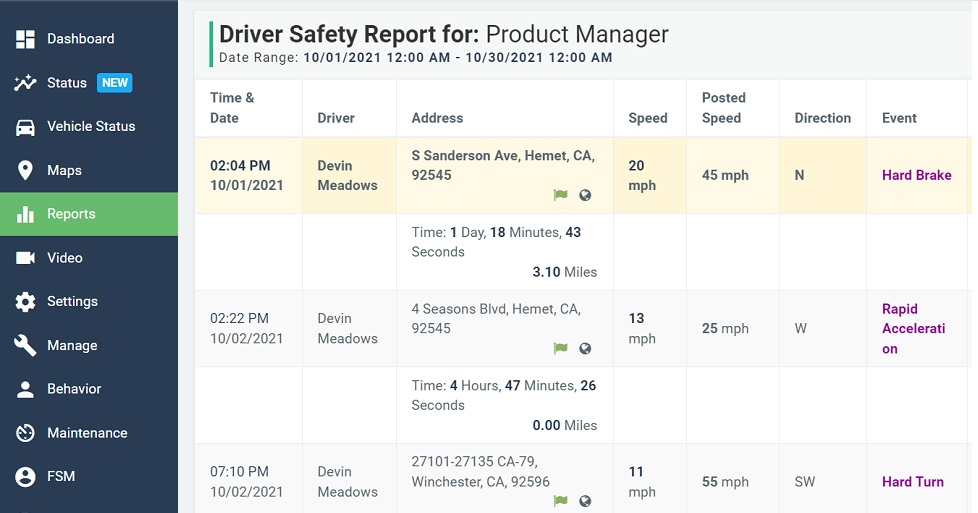
Driver scorecards help fleet managers review driving behavior across specific metrics. Depending on the fleet’s safety program and system configuration, scorecards may include events such as:
- Speeding
- Harsh braking
- Rapid acceleration
- Hard cornering
- Sudden stops
- Idle time
- Safety events
Scorecards can help managers identify coaching opportunities and recognize drivers who follow safe, efficient driving practices. They can also help teams review trends over time instead of reacting to isolated events.
Driver behavior can have a meaningful impact on fuel use, safety risk, and vehicle wear. Automotive Fleet has reported that driver behavior can affect up to 30% of a vehicle’s fuel efficiency, and that changing certain behaviors can reduce annual fuel consumption by 5% to 30%. Results will vary by fleet, but the takeaway is important: driver coaching can be one of the most practical ways to control avoidable operating costs.
As Zonar’s Savanna Brewer explained, “By monitoring your idle time, you can reduce your fuel overhead, whether you've tied in a WEX card or not. You're sitting there running your engine burning fuel. So if you reduce that you reduce your fuel consumption.”
Driver behavior can also affect maintenance costs. Hard braking, rapid acceleration, speeding, and excessive idling can increase stress on brakes, tires, engines, and other components. With telematics reports, fleet managers can identify patterns that may contribute to unnecessary wear and use that information to coach drivers, improve preventive maintenance planning, and extend vehicle life where possible.
3. Maintenance Reminder Reports
Preventive maintenance is easier to manage when fleet teams have accurate mileage, engine-hour, and service-interval data. Maintenance reminder reports can help managers plan service before small issues become larger problems.
Instead of relying only on whiteboards, spreadsheets, or manual reminders, fleets can use telematics data to schedule maintenance based on mileage, engine hours, calendar intervals, or other thresholds.
As Brewer explained, “You can base your maintenance intervals on mileage on the hours the engine has run or just number of days, and it doesn't have to be just one you can say, every 600 miles or every 45 days, you know, whichever threshold you hit first.”
Maintenance reports may also help teams review recurring issues, track completed service, and reduce the administrative burden of managing preventive maintenance across many vehicles. When paired with regular driver inspections and issue reporting, these reports can help fleets move from reactive repairs toward more planned maintenance workflows.
4. Vehicle Tracking Reports
Vehicle tracking reports show where vehicles are, where they have been, and how they moved through the day. These reports can support dispatching, customer updates, route review, service verification, and asset utilization.
Fleet managers can use location history to review routes, confirm stops, investigate delays, and understand how vehicles are being used. When combined with geofences or landmarks, vehicle tracking can also help document arrivals and departures at customer sites, yards, job sites, or restricted locations.
Geofences and landmarks can be especially useful for fleets that need to verify service activity. For example, a lawn care, field service, delivery, or construction fleet may need to know which vehicle visited which customer location and how long it stayed there.
5. Mileage Reimbursement Reports
Mileage reimbursement reports can help organizations document miles driven for approved business purposes. For companies that reimburse employees for personal vehicle use, this can reduce manual tracking and support more consistent reporting.
For commercial fleets, mileage data may also support state mileage reporting, tax workflows, and internal cost allocation. Fleets operating across state lines should verify the reporting requirements that apply to their operations and maintain appropriate records.
For fleets subject to International Fuel Tax Agreement requirements, accurate mileage reporting can help simplify the process of documenting miles traveled by state and preparing reports for the appropriate tax authorities.
6. Detailed Vehicle Activity Reports
Detailed vehicle activity reports provide a closer look at what happened during a trip or workday. Depending on the system, these reports may show events such as:
- Ignition on and off
- Trip start and stop
- Geofence entry and exit
- Mileage
- Elapsed time
- Idle time
- Device or antenna status changes
These reports can be reviewed as lists, maps, or event histories. They can help fleet managers understand route activity, verify stops, review unusual events, and support driver or customer conversations with better context.
Detailed activity reports can also support dispatching and field coordination. For route-based teams, managers may use this information to understand whether work is happening as planned and where delays or inefficiencies appear during the day.
7. Landmark Reports
Landmark reports show activity around defined locations, such as customer sites, yards, warehouses, job sites, fuel stations, restricted zones, or service areas. Fleet teams can use landmarks to see which vehicles visited a location, when they arrived, when they left, and how long they stayed.
This can help verify service activity, review route execution, monitor time on site, and identify unexpected vehicle movement. For service fleets, landmark reports can also support customer communication and proof-of-service workflows.
Landmark reporting can work in both directions. A manager may review a vehicle to see which landmarks it visited, or review a landmark to see which vehicles arrived there during a selected time period.
8. State Miles Reports
State miles reports can help fleets understand how many miles vehicles traveled in each state. This can be useful for interstate operations, tax reporting, internal cost tracking, and compliance workflows.
Fleets subject to International Fuel Tax Agreement requirements or other mileage-based reporting obligations should confirm current rules and maintain records that meet applicable requirements.
By using telematics data for state mileage reporting, fleets can reduce the amount of manual work required to collect and organize mileage information across multiple vehicles and jurisdictions.
9. Time Sheet Reports
Time sheet reports can help managers review workday activity based on vehicle events, such as first ignition, last ignition, stop times, and time spent at specific locations. These reports may support payroll review, job costing, customer billing, or productivity analysis, depending on the fleet’s policies and systems.
Vehicle-based time data should be used carefully and in accordance with company policy, labor requirements, and employee notice practices. It is most useful when paired with clear procedures for clock-in, clock-out, job assignment, and manager review.
For field service or route-based teams, time sheet reporting can help managers compare scheduled activity against actual field activity and identify where workflows may need improvement.
10. Moving Reports
Moving reports can help fleet managers review what happens between vehicle start and stop. These reports may show route activity, drive time, idle time, stop duration, and movement patterns.
Fleet teams can use this information to compare routes, review delays, identify excessive idling, and look for opportunities to reduce unnecessary miles. Over time, moving reports can help managers make more informed decisions about routing, scheduling, and vehicle utilization.
For fleets focused on fuel costs, moving reports can be especially useful when paired with driver scorecards, idling reports, and route history. Together, these reports can help managers identify where fuel is being wasted and which changes may have the greatest impact.
How GPS Vehicle Tracking Reports Support Better Fleet Decisions
GPS vehicle tracking reports give fleet teams both current visibility and historical context. Current data can help dispatchers respond to what is happening now. Historical reports can help managers identify patterns, review budgets, coach drivers, plan maintenance, and make better operational decisions.
The most valuable reports are the ones tied to specific goals. A fleet focused on fuel management may prioritize idling, route, and driver behavior reports. A service fleet may focus on landmarks, time on site, and proof of service. A refrigerated fleet may prioritize temperature monitoring and alerts.
Fleet reporting can also help managers make the case for operational changes. When leaders can see the cost of idling, inefficient routes, delayed maintenance, or underused vehicles, it becomes easier to prioritize improvements and track progress over time.
How Zonar Can Help
Zonar helps fleet teams bring vehicle, driver, asset, and operational data into clearer view. With fleet management, GPS tracking, reporting, maintenance, driver behavior, geofencing, and visibility tools, Zonar can help organizations use fleet data to make more informed decisions across daily operations.
To learn how Zonar can support your fleet reporting and vehicle tracking goals, contact the Zonar team.