What Are Geofence Alerts in Fleet Tracking?
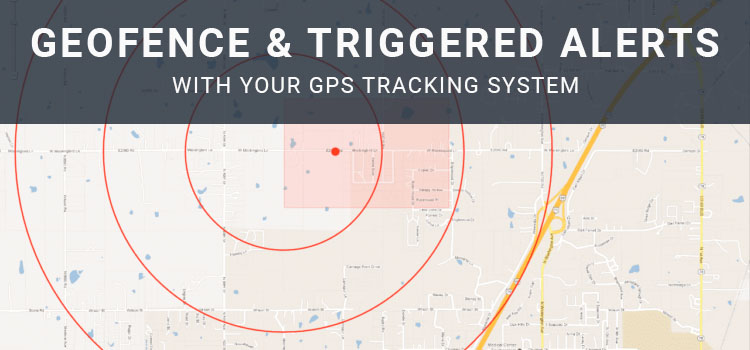
Geofence alerts are one of the most useful features in a GPS fleet tracking system. A geofence is a virtual boundary that fleet managers can draw around a location on a map. When a vehicle, driver, or asset enters or exits that boundary, the system can record the event or send an alert.
Instead of watching a live map all day, fleet teams can use geofences to monitor important locations automatically. This can help managers confirm arrivals, review departures, identify unauthorized movement, improve customer communication, and support better accountability across daily operations.
What Is a Geofence?
A geofence is a defined area on a digital map. It can be a simple radius around a single point or a custom shape drawn around a larger area such as a job site, yard, warehouse, customer location, service zone, terminal, school, depot, or restricted area.
Fleet teams commonly create geofences around:
- Company yards and parking areas.
- Customer sites.
- Warehouses and distribution centers.
- Job sites.
- Delivery zones.
- Restricted or high-risk areas.
- Fueling locations.
- Service territories.
- Maintenance facilities.
- Asset storage areas.
Geofences help turn location data into more useful operational information. Instead of only seeing where a vehicle is, managers can understand when it arrived, when it left, and how long it stayed.
How Geofence Alerts Work
Geofence alerts are triggered when a tracked vehicle or asset crosses a defined boundary. Depending on the fleet management system, alerts may appear in a dashboard, email, text message, mobile notification, or report.
Arrival, departure, and boundary notifications
Geofences can help managers track important location-based events without requiring constant manual monitoring. For example, a dispatcher can receive an alert when a vehicle arrives at a customer site, leaves a depot, enters a restricted area, or returns to the yard after hours.
Geofence events can also create timestamps that are useful for reviewing previous activity. This can help teams answer questions about job-site time, route progress, service windows, customer visits, and vehicle utilization.
Common Ways Fleets Use Geofences
Geofences can support many different fleet workflows. The best use cases depend on the fleet’s vehicles, routes, customers, assets, and service model.
Confirming job-site arrivals and departures
For service, construction, utility, and field operations, geofences can help confirm when a vehicle arrived at or left a job site. This can support customer communication, billing review, proof-of-service workflows, and internal accountability.
If a customer asks whether a technician arrived on time, a manager can compare geofence activity with work orders, driver notes, forms, photos, or service records.
Monitoring yards, depots, and terminals
Geofences around company yards or terminals can help managers see which vehicles are available, which vehicles are in the field, and whether a vehicle moved outside normal operating hours.
This can support dispatch planning, vehicle utilization, after-hours movement review, and asset protection.
Managing service territories
Some fleets assign drivers, sales teams, or service vehicles to specific territories. Geofences can help managers understand when vehicles enter or exit those areas and whether work is being performed within the assigned service region.
This can be useful for balancing workloads, reducing unnecessary travel, and identifying route or territory issues.
Protecting restricted or high-risk areas
Fleet managers may create geofences around areas where company vehicles should not go, such as restricted sites, unsafe zones, unauthorized fuel locations, or areas outside approved operating boundaries.
When a vehicle enters one of those areas, the system can alert the appropriate manager so they can review the situation and follow up if needed.
Tracking trailers, equipment, and mobile assets
Geofences are not limited to vehicles. Fleets can also use them with asset tracking to monitor trailers, generators, containers, construction equipment, portable signs, and other mobile assets.
For example, a geofence around a job site can help confirm that a trailer or piece of equipment is still on location. A geofence around a storage yard can help alert managers when an asset leaves unexpectedly.
Geofences vs. Landmarks
Some fleet systems also use landmarks. A landmark usually represents a specific point or known location, while a geofence represents a defined boundary around an area.
A landmark may be useful for a single address, building, or point of interest. A geofence may be better for a larger area such as a construction site, campus, customer facility, terminal, neighborhood, or multi-building property.
The right option depends on how precise the location needs to be and what kind of activity the fleet wants to monitor.
Best Practices for Geofence Alerts
Geofences work best when they are planned carefully. Too few geofences may leave important locations unmonitored. Too many alerts can create noise and cause managers to ignore important notifications.
Helpful best practices include:
- Create geofences around locations that support a clear business purpose.
- Use meaningful names for each geofence.
- Set alert rules based on who actually needs to know.
- Avoid sending every alert to every manager.
- Review alert frequency to reduce unnecessary notifications.
- Adjust geofence size to account for GPS variation, property size, and road layout.
- Use reports to identify recurring delays, unauthorized stops, or utilization patterns.
- Review geofence settings regularly as routes, customers, and job sites change.
Privacy and Policy Considerations
Geofence alerts should be used transparently and for legitimate business purposes. If geofences are used to monitor company vehicles, driver activity, work locations, or take-home vehicles, employees should understand what is being tracked and how the information may be used.
A clear policy should explain:
- Which vehicles, assets, or devices are tracked.
- When tracking occurs.
- Which locations may trigger alerts.
- Who can access location and geofence data.
- How long records are retained.
- How data may be used for dispatch, service verification, safety, payroll support, or policy review.
- How employees can report incorrect assignments or data issues.
Privacy, labor, employee-notice, and wage-and-hour requirements can vary. Businesses should review applicable requirements before using geofences for employee-related workflows.
How Geofence Alerts Improve Fleet Operations
Geofence alerts can help fleets move from reactive check-ins to more proactive management. Instead of waiting for a phone call or manually checking vehicle locations, managers can receive automatic updates when important location events occur.
Geofences can support:
- Better dispatch visibility.
- Improved customer ETA communication.
- More accurate arrival and departure records.
- Reduced manual check-ins.
- Stronger asset accountability.
- Better territory management.
- After-hours movement alerts.
- More useful route and utilization reporting.
Like any fleet management tool, geofences are most valuable when teams use the data consistently and connect alerts to clear workflows.
How Zonar Can Help
Zonar helps fleet teams bring vehicle, driver, asset, and operational data into clearer view. With fleet management, GPS tracking, geofencing, alerts, route history, driver behavior reporting, maintenance tools, and asset visibility, Zonar can help organizations monitor fleet activity and make more informed decisions across daily operations.
To learn how Zonar can support your fleet visibility and geofence alert workflows, contact the Zonar team.