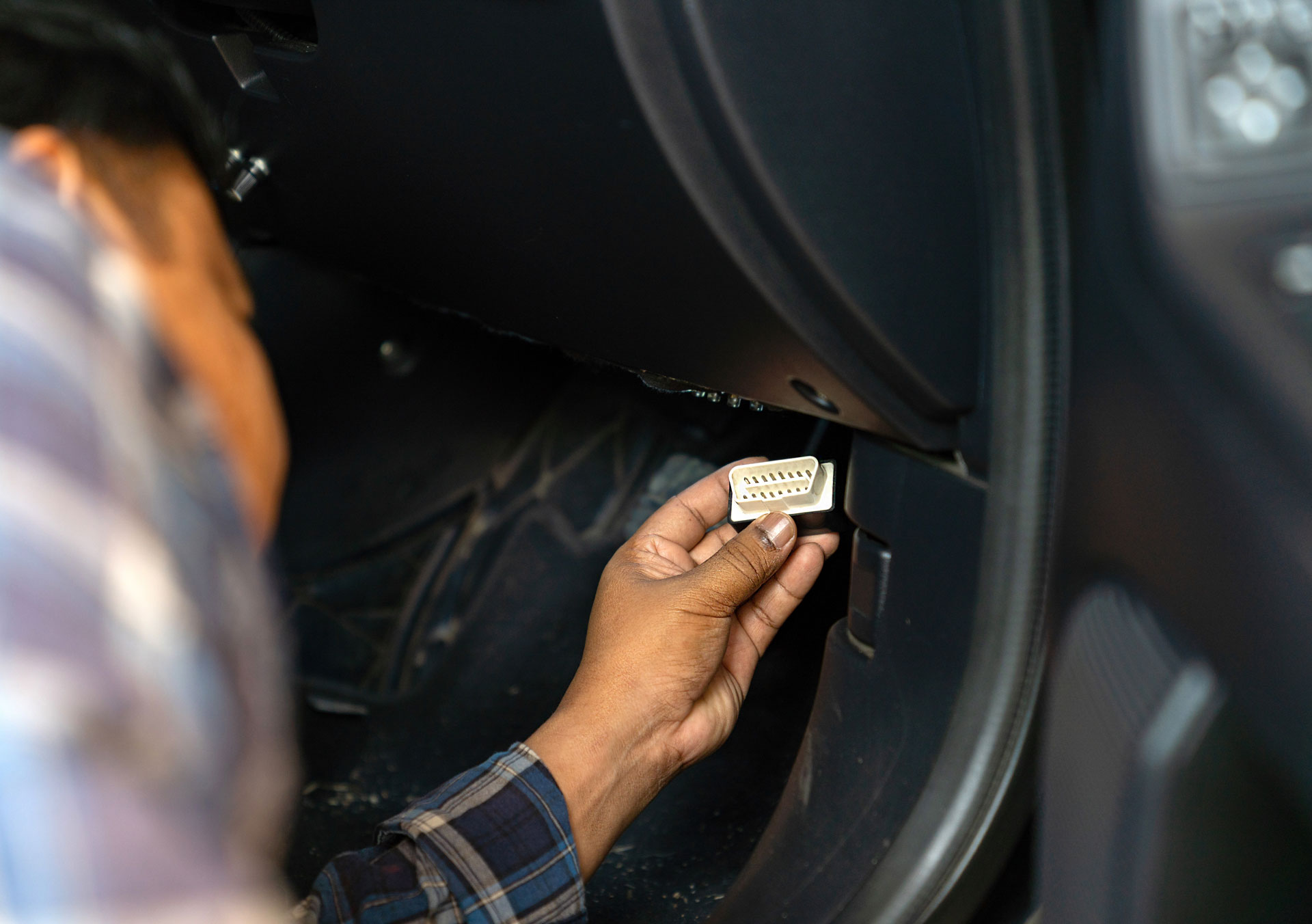
Many plug-and-play fleet tracking devices connect through a vehicle’s OBD-II port. For fleet teams, that can make installation faster and simpler because the device can access vehicle power and certain diagnostic information without a complex hardware setup.
Still, some operators have practical questions before using an OBD-II fleet tracker.
-
Can a plug-in tracker affect the vehicle’s electrical system?
-
Will it interfere with diagnostics?
-
What happens when a mechanic needs to connect a scan tool?
The short answer is that OBD-II-based tracking is common, but fleet teams should still use compatible hardware, follow installation guidance, and choose the right setup for each vehicle type.
For fleets that operate compatible light-duty vehicles, OBD-II fleet tracking can be a fast way to connect vehicles to a fleet management system. For other vehicles, assets, or operating environments, a hardwired, OEM-grade telematics control unit may be the better option.
What is an OBD-II port?
An OBD-II port is a standardized diagnostic connection used to access information from a vehicle’s onboard diagnostics system. OBD stands for on-board diagnostics, and OBD-II refers to the second generation of that diagnostic standard.
In many cars and light-duty vehicles, the OBD-II port is a 16-pin connector located under the dashboard, often near the driver’s side. Mechanics, technicians, and vehicle owners use the port to connect a diagnostic scan tool that can read information from the vehicle’s onboard computer and related systems.
For example, when a check engine light appears, a scan tool connected to the OBD-II port can retrieve diagnostic trouble codes, also called DTCs. These fault codes can help identify which vehicle system may need attention, such as emissions, engine performance, fuel system behavior, or sensor activity.
OBD-II vs. OBD2
OBD-II and OBD2 usually refer to the same thing, representing a significant advancement over the original OBD-I systems. OBD-II is the more formal way to write the term, while OBD2 is a common shorthand. In fleet operations, both terms are often used to describe the diagnostic port, the onboard diagnostics system, or devices that connect through that port.
What is the OBD-II port used for?
The OBD-II port is used to connect diagnostic and telematics devices to a vehicle. Depending on the vehicle, device, and system configuration, the port may provide access to data points such as mileage, speed, RPM, battery voltage, emissions-related information, diagnostic trouble codes, and vehicle identification number details.
For maintenance teams, that information can help shorten diagnostic time.
Instead of waiting for a driver to describe a problem in detail, technicians can use a scan tool or connected fleet system to review fault codes and supporting vehicle data. That can help identify whether the issue is urgent, intermittent, or something that should be monitored before the next service interval.
For fleet managers, OBD-II data can support broader fleet management platform workflows. When diagnostic data is combined with GPS location, driver activity, trip history, and maintenance records, teams can get a clearer view of vehicle health and day-to-day operations.
How do GPS trackers use the OBD-II port?
A plug-in GPS tracking device can use the OBD-II port for power and vehicle data access. Once connected, the device can transmit information such as vehicle activity, location, mileage, diagnostic alerts, and other data points to a fleet management platform.
OBD-II-based trackers are popular because they can often be installed quickly and may not require extensive vehicle modifications. That makes them useful for certain fleets that need faster deployment, temporary installations, or a simpler way to connect compatible vehicles to a telematics system.
Some devices are designed to plug directly into the diagnostic port. Others may use an extension cable, mounting bracket, or installation accessory so the device can be secured while still allowing technician access to the port. If a mechanic needs to connect a scan tool, the fleet’s installation policy should explain whether the tracking device can be temporarily removed, whether a splitter or pass-through connection is approved, or whether the vehicle should use a different installation method.
What data can be accessed through the OBD-II port?
The exact data available through the OBD-II port depends on the vehicle, the onboard computer, the supported OBD protocols, and the connected device.
Common examples may include:
- Diagnostic trouble codes: Fault codes that help identify vehicle systems that may need attention.
- Check engine light status: Alerts related to emissions or engine system behavior.
- Mileage and vehicle activity: Information that can support usage reporting and maintenance planning.
- RPM and speed data: Vehicle operation details that may support reporting, coaching, or exception review.
- Battery voltage: A useful signal for identifying possible electrical or power-related issues.
- VIN: Vehicle identification number details that can help match a device to the correct asset record.
In technical terms, OBD-II communication may involve standards and protocols such as SAE J1962 for the connector, ISO 15765-4 for CAN-based communication, and other protocols used by different vehicle makes and model years.
Modern vehicles often rely on the CAN bus, short for Controller Area Network, to let vehicle systems communicate. Older vehicles may use different protocols, including K-line or other legacy communication methods.
Where is the OBD-II port located?
In many light-duty vehicles, the OBD-II port is located below the dashboard on the driver’s side. It may be under the steering column, near the kick panel, or behind a small cover. The exact location can vary by make, model, and year.
For fleets, port location matters because it affects installation quality, driver access, technician access, and device security. A device that hangs loosely below the dashboard may be more likely to be bumped, unplugged, or damaged. A more secure installation can reduce avoidable reporting gaps and help keep the device connected during normal vehicle use.
Are OBD-II fleet trackers safe?
OBD-II fleet trackers are widely used, but safety and reliability depend on device design, vehicle compatibility, installation quality, and how the system is maintained. Fleet teams should use hardware designed for commercial fleet use and follow the manufacturer’s installation and support guidance.
A properly selected and installed tracking device should not interfere with normal vehicle operation. However, fleets should avoid unsupported hardware, damaged connectors, improper installation, or configurations that place stress on the port or wiring.
If a vehicle has unusual electrical behavior, repeated diagnostic issues, a persistent check engine light, or device reporting problems, the fleet team should review the installation, check compatibility, and work with the provider or a qualified technician to troubleshoot the issue.
Can an OBD-II tracker drain the battery?
Any connected electronic device uses some amount of power. Commercial fleet tracking devices are typically designed to manage power use, but fleets should still follow provider guidance, especially for vehicles that sit unused for long periods. If a vehicle has recurring battery issues, the tracking device, vehicle battery, alternator, and installation should all be checked as part of the diagnostic process.
Can a tracker interfere with a mechanic’s scan tool?
It depends on the installation. If the device occupies the OBD-II port, a technician may need access to that same connector. Some fleets allow temporary removal, while others use approved installation accessories or a different hardware setup. The important point is to document the process so maintenance teams know how to access the port without damaging the device or creating data gaps.
When might the OBD-II port not be the right fit?
Some fleets operate older vehicles, heavy-duty trucks, off-road equipment, trailers, powered assets, or specialized vehicles that may require a different installation approach.
Heavy-duty vehicles, for example, may use other diagnostic connectors and communication standards, such as J1939, rather than the same OBD-II setup found in many light-duty vehicles. Specialized assets may also have unique wiring, power, or mounting requirements.
In those cases, a direct-wired tracking device may be a better option. A hardwired installation can also be useful when a fleet wants a more secure setup that is less likely to be accidentally unplugged or removed. Hardwired devices may also be preferred when the OBD-II port needs to stay open for maintenance access or when the device must be mounted in a less visible location.
Plug-in vs. hardwired fleet tracking devices
Both plug-in and hardwired tracking options can support fleet visibility, alerts, reporting, and operational workflows. The right choice depends on the vehicle type, use case, and level of installation security needed.
OBD-II plug-in tracking
OBD-II plug-in tracking may be a good fit when a fleet wants a faster installation, easy device replacement, or a lower-complexity deployment for compatible light-duty vehicles. It can be useful for fleets that need location tracking, mileage visibility, diagnostic alerts, and basic vehicle activity reporting without a more involved installation.
Hardwired tracking
Hardwired tracking may be a better fit when the fleet needs a more secure installation, wants to reduce the risk of accidental unplugging, or operates vehicles and assets that do not support a standard OBD-II connection. A hardwired setup can also help keep the diagnostic port available for service teams.
Fleets comparing options should review available fleet telematics devices by vehicle class, installation type, operating environment, and data requirements before standardizing on one approach.
How can Zonar fleet tracking help?
Zonar helps fleet teams choose the right telematics hardware and installation approach for the vehicles they operate. For compatible light-duty vehicles, Zonar LD™ offers a plug-and-play option that installs through the vehicle’s OBD-II port and supports access to vehicle diagnostics, status, VIN, odometer, engine faults, location, and other fleet data.
For fleets that need a more rugged, secure, or vehicle-specific setup, Zonar also offers fleet telematics devices designed for light-duty, medium-duty, heavy-duty, and off-highway fleet assets. That gives teams flexibility to use an OBD-II installation where it fits and a different TCU strategy when vehicle type, operating environment, data needs, or device security require it.
With vehicle data flowing into the Zonar fleet management platform, teams can monitor vehicle activity, location, driver trends, maintenance needs, reporting exceptions, and day-to-day operations in one place. For more advanced maintenance workflows, Zonar fleet health solutions can help teams prioritize diagnostics, reduce downtime, and respond to issues before they become larger service problems.
To learn which fleet tracking setup is right for your vehicles, contact the Zonar team.
Disclaimer: This article is for general fleet management education only. Always follow the vehicle manufacturer’s guidance, device provider instructions, and qualified technician recommendations when installing, removing, or troubleshooting telematics hardware.