One common fleet tracking issue is not caused by the software itself. It happens when a GPS device is unplugged, loosened, or otherwise stops reporting from the vehicle.
That can happen for several reasons. A driver may accidentally bump the device under the dash, a technician may unplug it during service, or someone may intentionally tamper with the unit. Whatever the cause, an unplugged device can interrupt vehicle visibility and create gaps in fleet data.
Two simple hardware approaches can help reduce the risk: using a Y cable or securing the device with zip ties.
Why GPS Devices Get Unplugged
Many plug-in GPS tracking devices connect through the vehicle’s OBD-II port, which is typically located under the driver-side dashboard. In some vehicles, that location is exposed enough that the device can be bumped, pulled loose, or disconnected during normal use.
This may be more common in vehicles where drivers get in and out frequently, carry tools or equipment near the dashboard, or share vehicles across shifts. It can also happen when service technicians need access to the OBD-II port for diagnostics.
Data gaps can affect fleet visibility
A fleet management system depends on consistent vehicle data. When a device is unplugged or stops reporting, managers may lose visibility into location, route history, driver behavior, diagnostics, and other information that supports day-to-day operations.
Using a Y Cable to Secure the Device
A Y cable can help by creating two dedicated OBD-II connection points. One connection can be used for the GPS tracking device, while the other remains available for diagnostic tools or service access.
This setup can allow the tracking device to be positioned farther under the dash, where it is less likely to be accidentally loosened. It can also make routine service easier because technicians can access an OBD-II connection without disconnecting the fleet tracking unit.
Before using a Y cable, confirm that the cable is compatible with the vehicle and device. Fleet teams should follow manufacturer guidance and use qualified installation support when needed.
Using Zip Ties to Reduce Movement
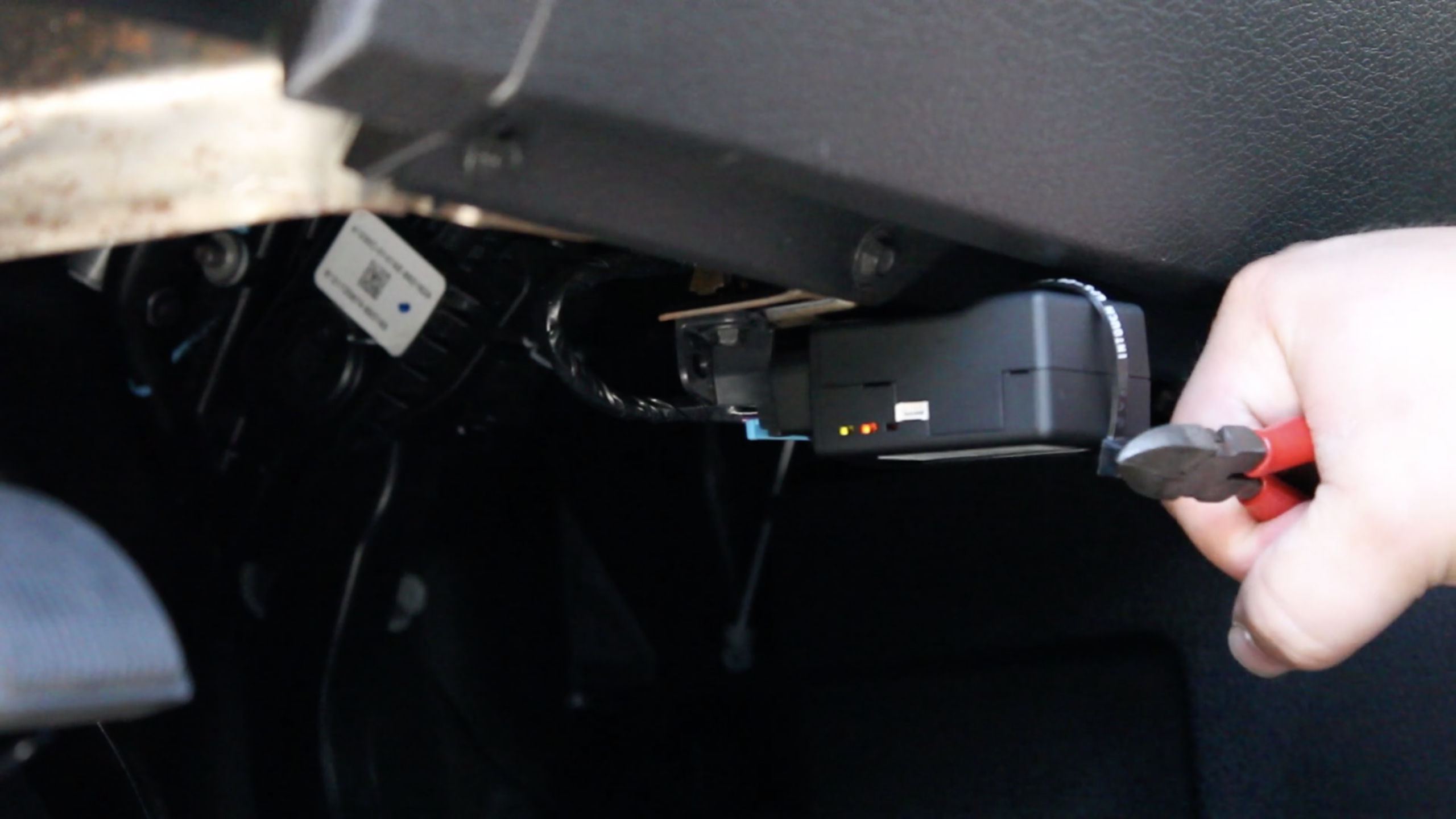
Zip ties can be a simple way to help keep a plug-in GPS device from moving or loosening. When installed properly, they can secure the device or cable to the OBD-II housing or another stable mounting point under the dash.
The key is to avoid placing tension on the connection or interfering with pedals, wiring, service access, or vehicle safety systems. Zip ties should be sized appropriately and checked periodically to make sure they remain secure.
Installation Best Practices
Whether you use a Y cable, zip ties, or another mounting method, the goal is to keep the device secure without creating new maintenance or safety problems.
Before installation, confirm the vehicle’s port location, cable compatibility, and clearance around the driver area. After installation, check that the device is reporting properly and that service teams know how to access the diagnostic port if needed.
If your fleet uses multiple vehicle types, document the preferred setup for each model. A consistent installation process can reduce troubleshooting time and help prevent avoidable data gaps.
Monitoring for Unplugged Devices
Hardware security is only part of the solution. Fleet teams should also monitor for device-health alerts, missed check-ins, or unexpected reporting gaps. These alerts can help managers identify when a device may have been unplugged, loosened, or affected by a connectivity issue.
When an alert appears, review the vehicle’s last known location, route history, driver assignment, and recent maintenance activity. That context can help determine whether the issue was accidental, service-related, or something that needs further follow-up.
How Zonar Can Help
Zonar helps fleet teams bring vehicle, asset, driver, and operational data into clearer view. With better visibility into device status, vehicle activity, and reporting exceptions, fleet leaders can reduce data gaps and make more informed decisions across safety, maintenance, compliance, and efficiency workflows.
To learn how Zonar can support your fleet visibility and device-management needs, contact the Zonar team.